Digital Wood Carver
DWC Engineering Reference Library

DWC2636 & DWC3648

Carousel ATC Wiring Reference

Revision: 2.0 Document: DWC-ATC-IO-CR Assembly & Service Reference

System Overview

Carousel ATC reference for DWC2636 and DWC3648 machines.

Machine Compatibility

Carousel ATC configuration.

Item Assignment Notes
MachinesDWC2636 / DWC3648Carousel ATC configuration
ControllerPlanetCNC MK3Current commercial controller platform
ATC TypeCarouselCarousel axis is B
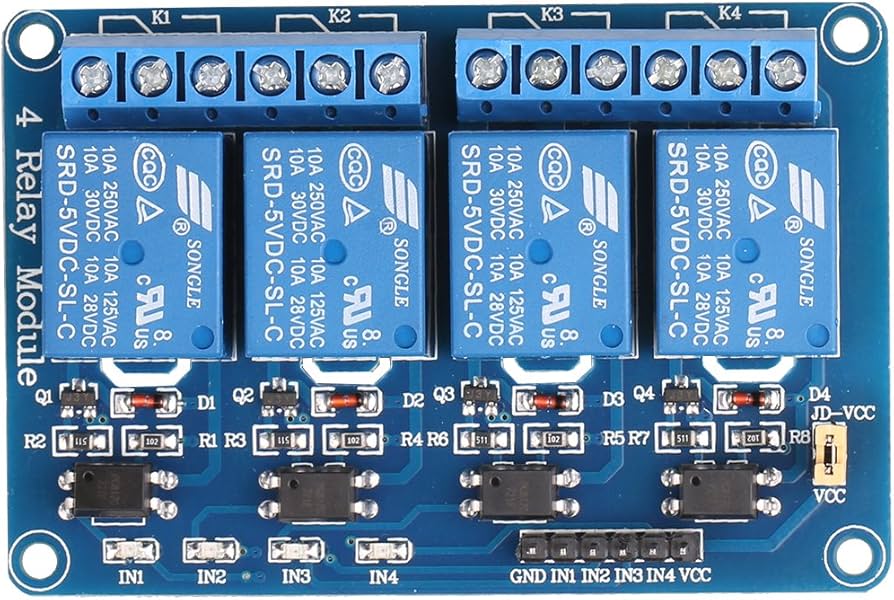
Relay BoardsOne 4-channel relay boardBoard #1 only
Cable ANot UsedBed cable eliminated for carousel configuration
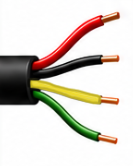
Cable BSpindle Cable4-conductor cable
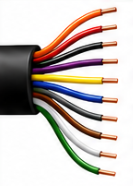
Cable CGantry Cable10-conductor cable
DWC Standard: Input 1 Digital Probe is reference only and is not part of the Carousel ATC system.
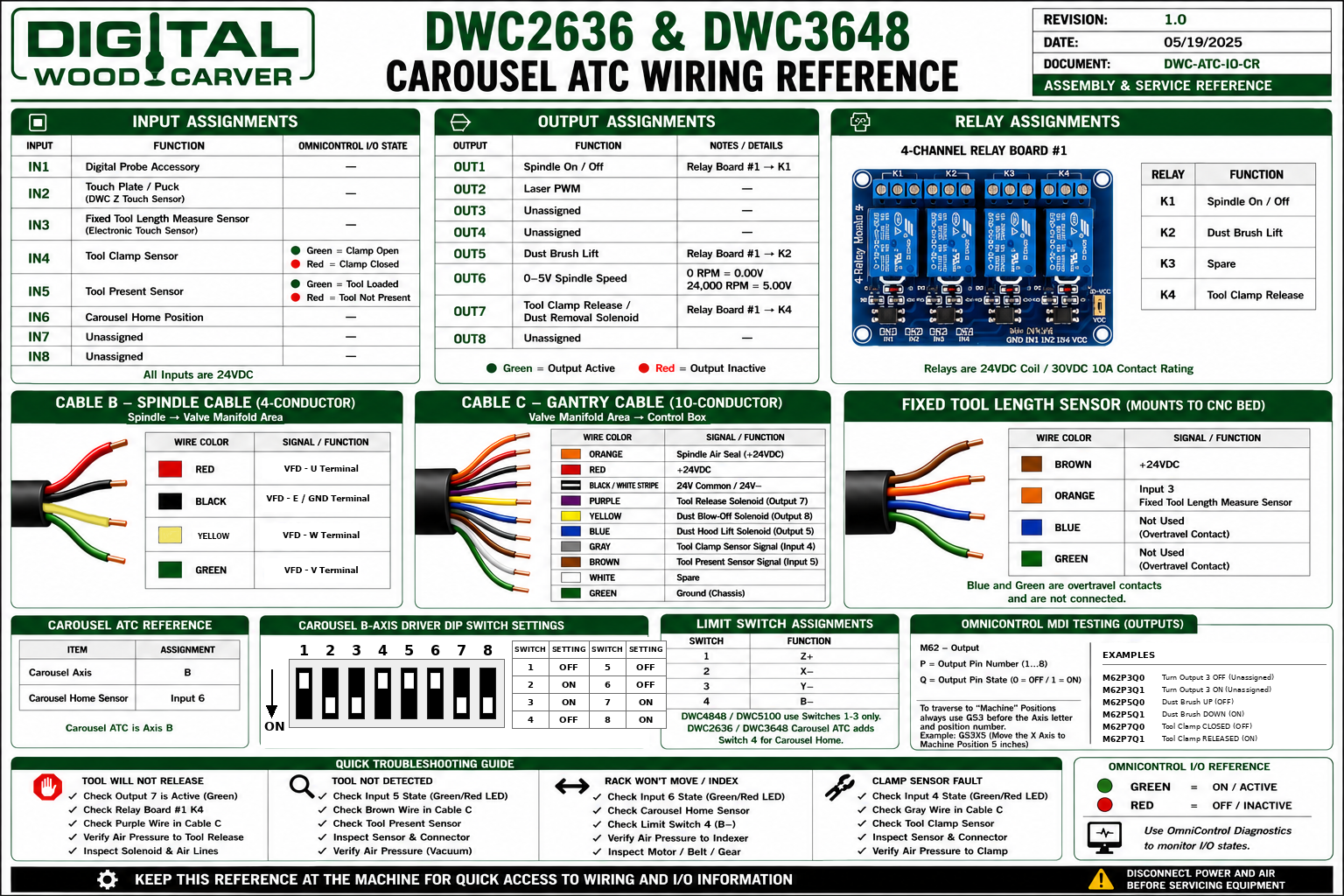
Printable Placard Reference

Latest approved wiring placard.

DWC2636 DWC3648 Carousel ATC placard
Keep this reference at the machine for quick access to wiring and I/O information.

Input Assignments

All inputs are 24VDC.

Input Function OmniControl I/O State
IN1Digital Probe AccessoryReference only
IN2Touch Plate / Puck (DWC Z Touch Sensor)
IN3Fixed Tool Length Measure Sensor (Electronic Touch Sensor)
IN4Tool Clamp SensorGreen = Clamp Open
Red = Clamp Closed
IN5Tool Present SensorGreen = Tool Loaded
Red = Tool Not Present
IN6Carousel Home Position
IN7Unassigned
IN8Unassigned

Output Assignments

Controller output functions and relay relationship.

Output Function Notes / Details
OUT1Spindle On / OffRelay Board #1 → K1
OUT2Laser PWM
OUT3Unassigned
OUT4Unassigned
OUT5Dust Brush LiftRelay Board #1 → K2
OUT60–5V Spindle Speed0 RPM = 0.00V
24,000 RPM = 5.00V
OUT7Tool Clamp Release / Dust Removal SolenoidRelay Board #1 → K4
OUT8Unassigned
OmniControl Output State: Green = Output Active. Red = Output Inactive.

Relay Assignments

Single 4-channel relay board used on DWC2636 / DWC3648 Carousel ATC.

4-channel relay board
Relay Function Controller Output
K1Spindle On / OffOUT1
K2Dust Brush LiftOUT5
K3Spare
K4Tool Clamp ReleaseOUT7
Relays are 24VDC coil / 30VDC 10A contact rating.

Cable B — Spindle Cable

4-conductor cable from spindle to valve manifold area.

Cable B spindle cable
Wire Color Signal / Function Notes
RedUVFD - U Terminal
BlackE/GNDVFD E / GND Terminal
YellowWVFD - W Terminal
GreenVVFD - V Terminal

Cable C — Gantry Cable

10-conductor cable from valve manifold area to control box.

Cable C gantry cable
Wire Color Signal / Function Notes
OrangeSpindle Air Seal (+24VDC)Valve manifold
Red+24VDCPower
Black / White Stripe24V Common / 24V−Common
PurpleTool Release Solenoid (Output 7)Relay Board #1 → K4
YellowDust Blow-Off Solenoid (Output 8)Listed wire function
BlueDust Hood Lift Solenoid (Output 5)Relay Board #1 → K2
GrayTool Clamp Sensor Signal (Input 4)Sensor signal
BrownTool Present Sensor Signal (Input 5)Sensor signal
WhiteSpareNot assigned
GreenGround (Chassis)Chassis ground

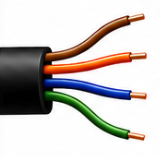
Fixed Tool Length Sensor

Mounts to CNC bed.

Fixed tool length sensor wiring
Wire Color Signal / Function Notes
Brown+24VDCSensor power
OrangeInput 3 — Fixed Tool Length Measure SensorSensor signal
BlueNot UsedOvertravel contact
GreenNot UsedOvertravel contact
Blue and Green are overtravel contacts and are not connected.

OmniControl MDI Testing

Output commands for quick bench/service verification.

Command Format: M62 = Output, P = Output Pin Number (1...8), Q = Output Pin State (0 = OFF / 1 = ON).
M62P3Q0
Turn Output 3 OFF (Unassigned)
M62P3Q1
Turn Output 3 ON (Unassigned)
M62P5Q0
Dust Brush UP (OFF)
M62P5Q1
Dust Brush DOWN (ON)
M62P7Q0
Tool Clamp CLOSED (OFF)
M62P7Q1
Tool Clamp RELEASED (ON)
Machine Position Travel: Use G53 before the axis letter when traversing to machine positions. Example: G53X5

Quick Troubleshooting Guide

Fast checks for common Carousel ATC service issues.

Tool Will Not Release

  • Check Output 7 is active.
  • Check Relay Board #1 K4.
  • Check purple wire in Cable C.
  • Verify air pressure to tool release.

Tool Not Detected

  • Check Input 5 state.
  • Check brown wire in Cable C.
  • Check tool present sensor.
  • Inspect sensor and connector.

Carousel Won't Move / Index

  • Check Input 6 state.
  • Check carousel home sensor.
  • Check Limit Switch 4 (B−).
  • Inspect motor, belt, and gear.

Clamp Sensor Fault

  • Check Input 4 state.
  • Check gray wire in Cable C.
  • Check tool clamp sensor.
  • Verify air pressure to clamp.

Official Documentation & Resources

Manufacturer resources and DWC support references.

Disconnect power and air before servicing equipment. Use OmniControl Diagnostics to monitor I/O states.